PR# 18107 Error code: VD42
Problem Report Summary
Submitter: vladal
Category: Compiler
Priority: Medium
Date: 2012/02/05
Class: Support
Severity: Non-critical
Number: 18107
Release: 7
Confidential: No
Status: Analyzed
Responsible:
Environment: Mozilla/5.0 (Windows NT 5.1) AppleWebKit/535.7 (KHTML, like Gecko) Chrome/16.0.912.77 Safari/535.7
Synopsis: Error code: VD42
Description
Hello. I have installed Eiffel Studio 7 and a traffic project for book Touch a Class. When I try to compile project an error occured
Configuration error: precompiled directory/file is unreadable.
What to do: make sure that the directory/file exists and that appropriate
  permissions are set ("read" for files, "read/execute" for directories).

Directory: c:\documents and settings\aleksandrov\Ìîè äîêóìåíòû\eiffel user files\7.0\precomp\spec\windows\EIFGENs

My system Windows XP is in Russian. May by the problem is in Ìîè äîêóìåíòû symbols? Thank you.
To Reproduce
Problem Report Interactions
I have a Visual Studio 2010 Rus and Windows SDK for Windows 7 installed. You can see it in a screenshot in the attachment
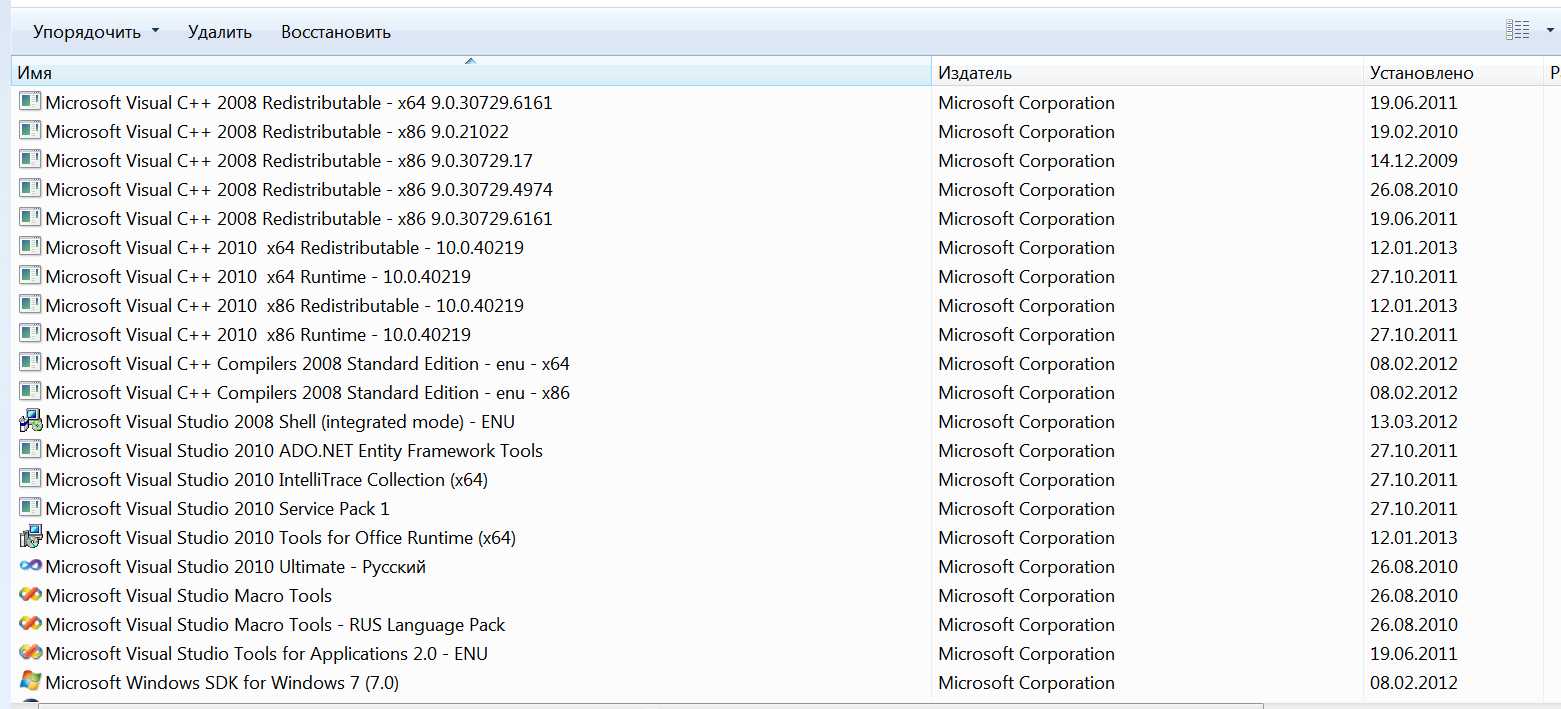
You can see an answer From: Alexander Kogtenkov, Date: 06.02.2012 in the history of the problem "BTW, since you are trying to compile projects prepared for an older version of EiffelStudio with a newer one, be ready to get more errors and warnings."

That is why I have used 6.2 version.
It seems that you have Visual Studio 2008 installed but missing the Windows SDK. You need to install the associated SDK to get a working environment. Or you can install the very latest Visual Studio 2012 that includes the SDK.
I have installed 7.2 32-bit version ?f Eiffel Studio. I have a 64-bit Windows7 OS system. I have download the Traffic project  here https://bitbucket.org/nadiapolikarpova/traffic/downloads
Errors of Compilation

		Description	Location	Position
	2	C Compiler Error: Fatal error C1083: Cannot open include file: 'windows.h': No such file or directory	w:\eiffel software\eiffelstudio 7.2 gpl\studio\spec\windows\include\eif_main.h	47, 1
		Error code: C Compiler Error

Error: External C/C++ compilation failed.
What to do: Check the external C/C++ compilation for details.

Fatal error C1083: Cannot open include file: 'windows.h': No such file or directory.
	2	C Compiler Error: Fatal error C1083: Cannot open include file: 'windows.h': No such file or directory	w:\eiffel software\eiffelstudio 7.2 gpl\studio\spec\windows\include\eif_main.h	47, 1
		Error code: C Compiler Error

Error: External C/C++ compilation failed.
What to do: Check the external C/C++ compilation for details.

Fatal error C1083:
....
Output truncated, Click download to get the full message
It seems that the C compilation was not done. Did you redo the precompilation from scratch? Also you are using a very old release of EiffelStudio that is not supported anymore. Could you try downloading the latest version instead?
After an year I'd like to try one more time
I have 2 warnings and 1 error

	VD43: Precompiled file is missing or unreadable. File 'c:\program files (x86)\eiffel software\eiffelstudio 6.2 gpl\precomp\spec\windows\EIFGENs\vision2\W_code\msc\driver.exe'.
Warning code: VD43
Configuration error: precompiled file is missing or unreadable.
What to do: make sure that the file exists, that appropriate permissions
  are set, and that the precompiled C code has been compiled.
File: c:\program files (x86)\eiffel software\eiffelstudio 6.2 gpl\precomp\spec\windows\EIFGENs\vision2\W_code\msc\driver.exe
	VD83: Warning that a setting could not be changed.
Warning code: VD83
Configuration warning: warning that a setting could not be changed.
What to do: do not change this setting or recompile the project from scratch.

Value of a setting could not be changed because the system is already compiled or uses a precompile: cls_compliant
Old: false
New: true

	VD00: General configuration parsing error.
Error code:
....
Output truncated, Click download to get the full message
The idea of calling "vsvars32.bat" is that it sets environment variables used by the C compiler to find header files, libraries, etc. So it has to be called in the same environment as EiffelStudio.
One way to do it is as follows:

1. Open console window (as an alternative, run "cmd" from Far).
2. Run "C:\Program Files (x86)\Microsoft VisualStudio 10.0\Common7\Tools\vsvars32.bat"
3. Run "C:\Program Files(x86)\Eiffel Software\EiffelStudio 6.2 GPL\studio\spec\windows\bin\estudio.exe"

Does it help?
First time by clicking in Windows, other time from Far
Just to be sure - do you run "vsvars32.bat" from Far as well?
Thank you very much! In WinXp everything is good now. Help me please with Win7.
I have called "vsvars32.bat" from C:\Program Files (x86)\Microsoft Visual Studio 10.0\Common7\Tools. Then start EiffelStudio from Far  C:\Program Files (x86)\Eiffel Software\EiffelStudio 6.2 GPL\studio\spec\windows\bin\estudio.exe
Error is the same :

Eiffel C/C++ Compilation Tool - Version: 6.2
Copyright Eiffel Software 1985-2008. All Rights Reserved.

Preparing C compilation...
eoption.c
big_file_C17_c.c
c:\program files (x86)\eiffel software\eiffelstudio 6.2 gpl\studio\spec\windows\include\eif_main.h(44) : fatal error C1083: Cannot open include file: 'windows.h': No such file or directoryc:\program files (x86)\eiffel software\eiffelstudio 6.2 gpl\studio\spec\windows\include\eif_main.h(44) : fatal error C1083: Cannot open include file: 'windows.h': No such file or directory

NMAKE : fatal error U1077: '"C:\Program Files (x86)\Microsoft Visual Studio 9.0\VC\BIN\cl.EXE"' : return code '0x2'
Stop.
NMAKE : fatal error
....
Output truncated, Click download to get the full message
Yes, the error looks similar. I would suggest to do the following:

1. Exit EiffelStudio.
2. Remove directory "c:\program files\eiffel software\eiffelstudio 6.2 gpl\precomp\spec\windows\EIFGENs".
3. Remove directory "EIFGENs" next to the project file, for example, for "F:\Projects\Eiffel\traffic\traffic_ev_1079\example\02_objects\objects.ecf" it is "F:\Projects\Eiffel\traffic\traffic_ev_1079\example\02_objects\EIFGENs".
4. Start EiffelStudio as you did last time.
5. Open the project and compile it.
6. During compilation you will be asked to precompile a library. Answer "yes".

Please, let us know about the results.
The second error is resolved
But the new one with C compiler has occured
Eiffel C/C++ Compilation Tool - Version: 6.2
Copyright Eiffel Software 1985-2008. All Rights Reserved.

Preparing C compilation...
big_file_C17_c.c
eoption.c
epattern.c
big_file_C16_c.c
efrozen.c
ecall.c
big_file_C15_c.c
eplug.c
eskelet.c
big_file_C14_c.c
evisib.c
big_file_C13_c.c
ececil.c
einit.c
big_file_C12_c.c
eparents.c
big_file_C11_c.c
big_file_C10_c.c
big_file_C9_c.c
big_file_C8_c.c
big_file_C7_c.c
big_file_C6_c.c
big_file_C5_c.c
big_file_C4_c.c
big_file_C3_c.c
big_file_C2_c.c
big_file_C1_c.c
欫»¿a«óá¡« Sᬽ«ó:         1.
emain.c
欫»¿a«óá¡« Sᬽ«ó:         1.
Microsoft (R) Windows (R) Resource Compiler Version 6.1.6723.1
Copyright (C) Microsoft Corporation.  All rights reserved.

Microsoft (R) Incremental Linker Version 9.00.30729.01
Copyright (C) Microsoft Corporation.  All rights reserved.

-STACK:5000000 -NODEFAULTLIB:libc -STACK:5000000 -NODEFAULTLIB:libc -SUBSYSTEM:WINDOWS -OUT:ob
....
Output truncated, Click download to get the full message
After changing EiffelStudio preferences to use English In XP 2 errors occured

1. "Warning code: VD83
Configuration warning: warning that a setting could not be changed.
What to do: do not change this setting or recompile the project from scratch.

Value of a setting could not be changed because the system is already compiled or uses a precompile: cls_compliant
Old: false
New: true"

2. "Error code: VD00
General configuration parsing error.
What to do: fix the configuration file.

Could not open file: c:\program files\eiffel software\eiffelstudio 6.2 gpl\library\gobo\gobo
$ISE_EIFFEL\library\gobo\gobo
Configuration: f:\projects\eiffel\traffic\traffic_ev_1079\library\traffic_vision2.ecf"

File gobo.ecf is situated in c:\program files\eiffel software\eiffelstudio 6.2 gpl\library\gobo directory
As to the issue on Windows XP, can you change EiffelStudio preferences to use English rather than Russian?

As to the issue on Windows 7, it seems to be related to some installation issues. Can you start EiffelStudio from a command line after setting VC environment variables by calling "vsvars32.bat" from VC installation?
And for Windows 7 64bit (also 6.2 32 bit version of Eiffel Studio)
error is

Eiffel C/C++ Compilation Tool - Version: 6.2
Copyright Eiffel Software 1985-2008. All Rights Reserved.

Preparing C compilation...
big_file_C17_c.c
eoption.c
c:\program files (x86)\eiffel software\eiffelstudio 6.2 gpl\studio\spec\windows\include\eif_main.h(44) : fatal error C1083: Cannot open include file: 'windows.h': No such file or directory
c:\program files (x86)\eiffel software\eiffelstudio 6.2 gpl\studio\spec\windows\include\eif_main.h(44) : fatal error C1083: Cannot open include file: 'windows.h': No such file or directory
NMAKE : fatal error U1077: '"C:\Program Files (x86)\Microsoft Visual Studio 9.0\VC\BIN\cl.EXE"' : return code '0x2'
Stop.
NMAKE : fatal error U1077: '"C:\Program Files (x86)\Microsoft Visual Studio 9.0\VC\BIN\cl.EXE"' : return code '0x2'
Stop.
Hello, I've installed 6.2 version and when I compile 02_object project (Traffic 3.3 application for Touch a Class book) errors occurred. Help me please.


******************************** Thread exception *****************************
In thread           Root thread            0x0 (thread id)
*******************************************************************************
-------------------------------------------------------------------------------
Class / Object      Routine                Nature of exception           Effect
-------------------------------------------------------------------------------
WEL_FONT            string_size_extended @37
                                           Segmentation violation:
<0000000005E50F2C>                         Operating system signal.      Fail
-------------------------------------------------------------------------------
WEL_FONT            string_size_extended @37
<0000000005E50F2C>                         Routine failure.              Fail
--
....
Output truncated, Click download to get the full message
Closing the report because the workaround for the issue is found and the fix is planned for the next public release of EiffelStudio.
Previous versions of EiffelStudio are available at
    http://sourceforge.net/projects/eiffelstudio/files/
ok, I'll try to use 6.2 version of eiffel studio. Could you give me links for WindowsXP 32 bit and Windows7 64 bit versions, please. In https://www2.eiffel.com/download/ only 7.0 version can be downloaded.
Please, change
    $ISE_LIBRARY\library\gobo\gobo.ecf
into
    $ISE_LIBRARY\library\gobo\gobo_all.ecf
in the file
    F:\Projects\Eiffel\traffic\traffic_ev_1079\example\02_objects\objects.ecf

BTW, since you are trying to compile projects prepared for an older version of EiffelStudio with a newer one, be ready to get more errors and warnings.
Hello! 2 new errors occured now :)
Error code: VD00
General configuration parsing error.
What to do: fix the configuration file.
Could not open file: c:\program files\eiffel software\eiffelstudio 7.0 gpl\library\gobo\gobo.ecf
$ISE_LIBRARY\library\gobo\gobo.ecf
Configuration: F:\Projects\Eiffel\traffic\traffic_ev_1079\example\02_objects\objects.ecf

Warning code: VD83
Configuration warning: warning that a setting could not be changed.
What to do: do not change this setting or recompile the project from scratch.

Value of a setting could not be changed because the system is already compiled or uses a precompile: cls_compliant
Old: false
New: true

I have similar preblems at home with Windows 7. (Now I write about XP at work)
Unfortunately our support system does not allow to answer in Russian.

Most probably the precompilation failed for the same reason as the project did. First of all, please, delete the directory
	%USERPROFILE%\Local Settings\Application Data\Eiffel Software
Then start project compilation from scratch. During compilation the library Vision2 will be precompiled.

If it does not help, we'll examine what happens step by step, so keep us informed about results.
Yes, I use "clean compile" Alexander do you speak Russian? For me it easier to write in Russian. In the proporties of project I have changed the path for vision2_pre. An error is the same, but the path is new. May be I need to copy any files to this directory? Thank you for your answers!
Error
Configuration error: precompiled directory/file is unreadable.
What to do: make sure that the directory/file exists and that appropriate
  permissions are set ("read" for files, "read/execute" for directories).

Directory: f:\projects\eiffel\eiffel user files\7.0\precomp\spec\windows\EIFGENs
Do you recompile the project from scratch? If not, please, make sure to perform clean compile as described at
	http://doc.eiffel.com/book/eiffelstudio/clean-compile
I have updated all path in Windows Register in HKLM.
ISE_PRECOMP F:\Projects\Eiffel\Eiffel User Files\7.0\precomp\spec\windows\
ISE_USER_FILES F:\Projects\Eiffel\Eiffel User Files\7.0

But the same error occuries.
The environment variable you need to set is ISE_USER_FILES. It should specify the path to any suitable location without cyrillic letters. Please, make sure the full paths to the projects, you are going to work on, do not contain cyrillic letters either.
Depending on the way you start EiffelStudio and your personal preferences, the variable can be set via environment or Windows registry. The details can be found at
	http://dev.eiffel.com/Environment_Variables
Thank you! And where do I need to change paths? In "about" point of menu I see such information:
$ISE_EIFFEL = C:\Program Files\Eiffel Software\EiffelStudio 7.0 GPL
$ISE_LIBRARY = C:\Program Files\Eiffel Software\EiffelStudio 7.0 GPL
$ISE_PLATFORM = windows
$ISE_C_COMPILER = msc

In general.eis_path I changed the path but it does not solve the problem.
The presence of cyrillic characters in the path is indeed the cause of the issue. To workaround this problem, make sure the EiffelStudio installation and project paths contain only English letters, please.